Built for Claude Code, Cursor, Codex — and the developers who own the database. Credentials stay local. Sensitive data is masked automatically. Destructive queries are intercepted.
Partially open source · View on GitHub MySQL
MySQL
 PostgreSQL
 MongoDB
 Redis
Redis
 Elasticsearch
 ChromaDB
 DynamoDB
 Cloudflare D1
Handing an LLM a raw connection string is fast to set up — and easy to regret. Five risks show up the moment you ship.
LLMs hallucinate. A routine "clean up stale rows" task becomes DELETE FROM users with nobody awake to catch it.
Connection strings end up in the LLM's context window. One careless log export later, your postgres://user:pass@... is sitting in someone else's training data.
Customer names, bank card numbers, biometric data — if the agent queries it, it gets serialised into a prompt and sent to OpenAI, Anthropic, or wherever your model runs.
"An agent did it" isn't a compliance answer. SOC 2 and GDPR both require you to reconstruct which identity ran which statement, and when.
Agents inherit the developer's full credentials — usually read/write on every table. Least-privilege doesn't apply when a chatbot can TRUNCATE anything.
FutrixData runs locally on your machine and brokers every agent query. Credentials stay put, dangerous operations get blocked, and every query lands in a local hash-chained audit log you can verify from the CLI.
AI agents connect over MCP or Skill and only see query results — credentials never leak, raw access never leaves your machine.
Every statement is analysed before it runs. Destructive ops are blocked, expensive queries flagged, and every agent query lands in a local hash-chained audit log you can verify from the CLI.
A polished desktop app with a visual console and built-in AI chatbot, speaking to 8+ data sources from a single window.
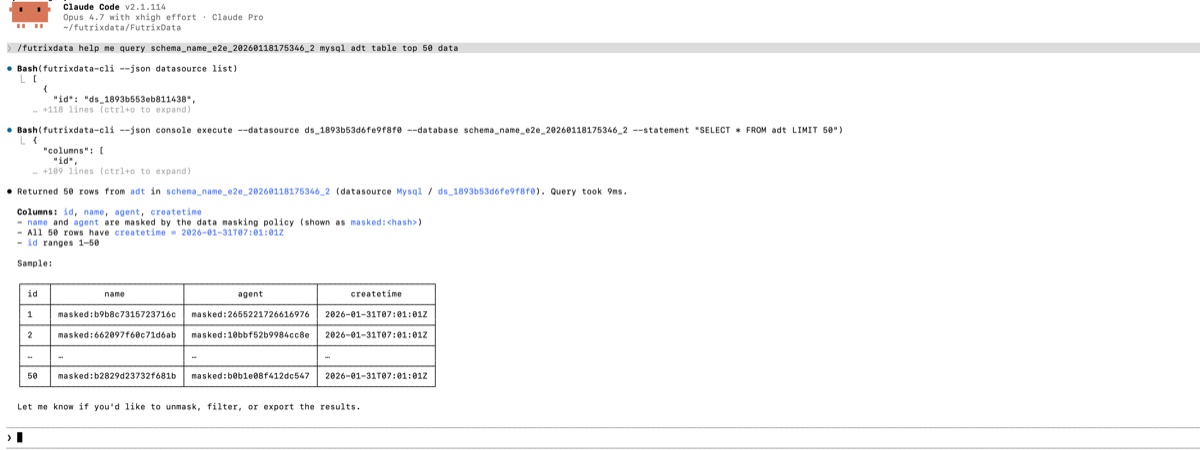
FutrixData sits between your AI agents — Claude Code, Codex, OpenCode, Cursor — and your production databases. Agents do only what they are allowed to, and never touch sensitive data or connection credentials.
Database passwords, connection strings, and auth tokens never leave your machine. AI agents connect through standard protocols and only receive sanitised results.
Fields tagged as sensitive are hashed on the fly, so your most valuable data never makes it into an LLM prompt.
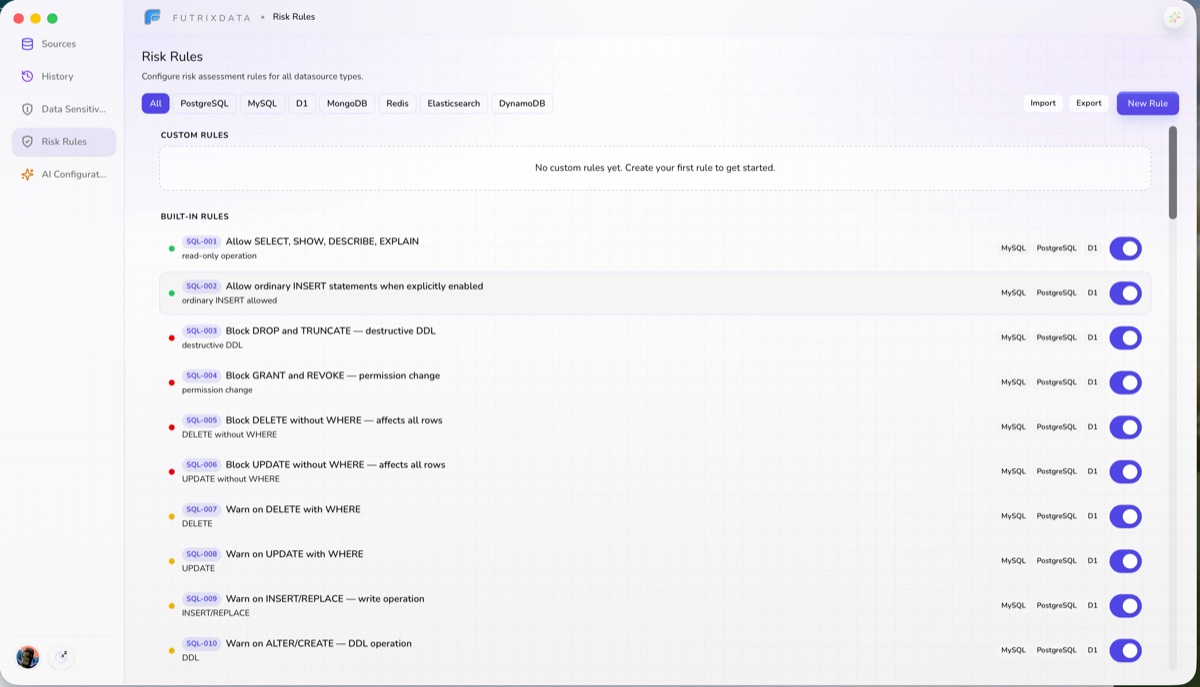
DROP TABLE, TRUNCATE, and mass DELETE are intercepted automatically and require human approval to proceed.
Queries are EXPLAIN-checked first. Full table scans, missing indexes, and costly joins are caught before they can hurt your production data.
DDL that drops indexes, alters primary keys, or changes critical structures requires explicit, configurable human confirmation.
Scope rules by data source, entity pattern, or operation. Row count and query cost thresholds are fully configurable.
The core safety net. Whether a statement comes from an AI agent or a human, the same risk engine inspects it first — and dangerous operations are actively blocked.
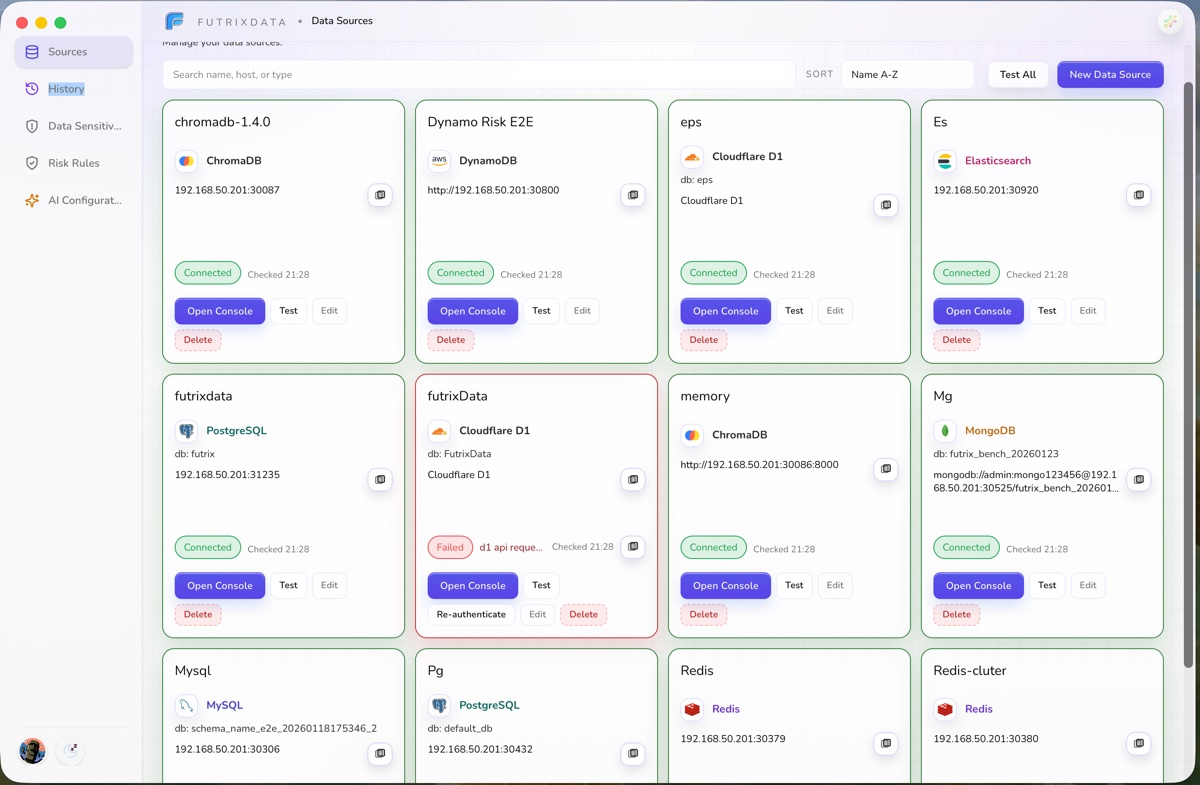
A polished desktop console that lets you manage databases, run queries, and collaborate with an AI assistant — all from a single window. No more juggling tools.
Monaco-powered SQL editor, virtual result tables, EXPLAIN visualisation, execution history, and light/dark themes.
Describe what you need in plain language. The agent drafts an optimised query, runs it through the risk engine, and charts the result.
FutrixData Enterprise Edition is the server build of the same gateway — deployed inside your own network and governing every AI agent that touches production data. Same risk engine, same PII masking, plus central admin, agent admission, and instant revocation.
Ships as a Docker image with Compose and Kubernetes recipes. Database credentials and AI inference can stay entirely inside your network.
Every Claude Code, Cursor, Codex, or in-house agent gets its own access key. Grant, scope, and revoke individually without affecting the rest.
Every tool call records the agent, source, target, statement, outcome, and any matched rule — ready for compliance review and incident response.
Cut off any agent's future access in real time. Long-running operations are re-checked mid-flight; revoked agents keep full historical audit.
Built for platform, security, and data teams in regulated industries.
From download to your first AI-assisted query in under five minutes.
Add MySQL, PostgreSQL, MongoDB, Redis, Elasticsearch, ChromaDB, DynamoDB, or D1. Credentials are encrypted and stored locally.
One command registers FutrixData as a tool for Claude Code, Codex, OpenCode, Cursor, or any MCP/Skill-compatible agent.
Every operation goes through the risk engine. Dangerous ones are blocked, sensitive fields are masked.
Free desktop app. Connect your databases, turn on the gateway for your AI agents, and manage everything from a single window.
v1.0.27 adds the Codex plugin flow, Vault-backed secret references, a 30-day local trial, and clearer SQL and datasource diagnostics.
No manual migration is required. Vault-backed credentials require an existing Vault KV v2 secret and provider configuration; Codex plugin users should authorize the plugin from the desktop app.